Real estate first sale
This worked example follows a made-up firm, Example Realty Pty Ltd, through its first listing. Jordan Lee is the selling agent. Alex Morgan is the seller, and the buyer, Pepper Ellis, is "the other side". Every name is fictional. Each step links to the page that covers it in full.
Why this matters
When your firm brokers a sale, both the seller and the buyer are your customers. You act for one and still owe checks on the other. Your own customer's checks and risk rating, and any approval your program requires, have to be on record before the service starts. Checks on the other side can be finished later where a delayed start is recorded under Rules 6-32. The steps below show the order of the work. See Customer due diligence.
Before you start
- Example Realty's AML/CTF program is approved and covers real estate. See Your AML/CTF program.
- Jordan's personnel due diligence and AML/CTF training are current. Duely will not create the engagement if either is overdue. See Personnel due diligence.
- Jordan has Alex's email address and date of birth.
Steps
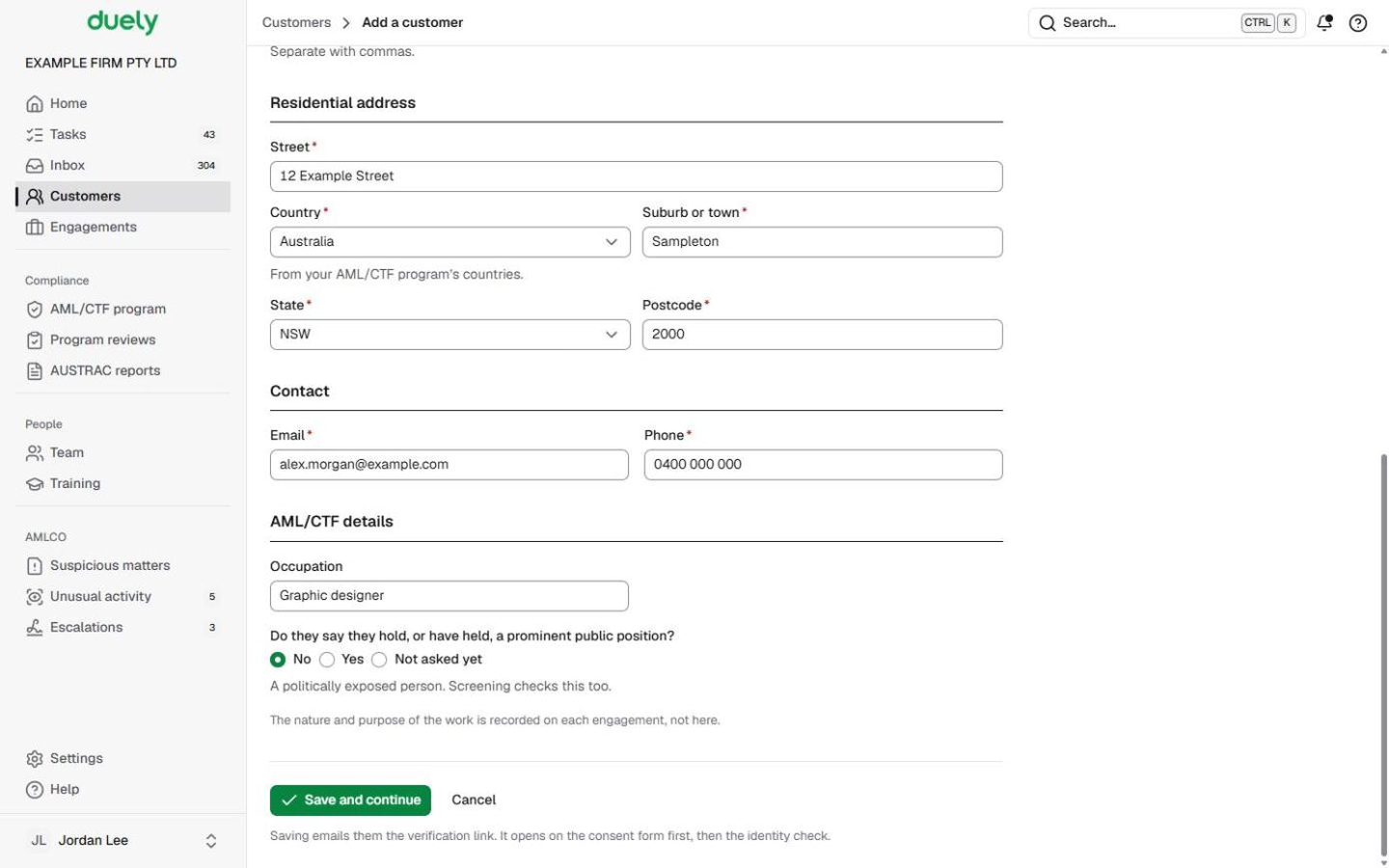
- Add the seller. Jordan opens Customers, chooses Add a customer, then A person, and picks Individual. He enters Alex Morgan's name, date of birth, address, email and phone, answers the public position question, and chooses Save and continue. Saving sends Alex the identity check link. See Add a person.

- Alex verifies. The link opens the firm's consent form, then the ID scan and selfie. Jordan follows the ticks on the Checks tab under Identity and uses Send a reminder if Alex is slow. See Identity checks.
- Screen Alex. Under Screening, Jordan chooses Run screening and opens any tile with something to decide. He answers the guided questions and chooses Save decision. See Screening and matches.
- Sign off initial CDD. When the step reads Ready to sign off, Jordan chooses Complete initial CDD, checks the Proposed starting risk and confirms it. Alex now reads Ready for engagements. See Complete initial CDD.
- Add the buyer. Jordan adds Pepper Ellis the same way. If the buyer only becomes known once an offer is accepted, this happens later, from the engagement.
- Start the engagement. Jordan chooses New engagement. On Services he ticks the designated service Example Realty's program lists, answers Who do you act for? with The seller, chooses One job (occasional transaction) and sets Who leads it? to himself. On Customers he adds Alex as the main customer, records the nature and purpose, and adds Pepper. Duely marks Pepper as the other side, because Example Realty does not act for the buyer. On Review he chooses Create engagement. See Start an engagement.
- Ask the buyer's firm for their checks. If Pepper's conveyancer has already checked Pepper, Jordan opens the engagement's Customers and people tab and chooses Ask their firm for the checks. He fills in Their firm, Who the request is for and Email, ticks at least one item under What's wanted, sets Due back by and chooses Send the request. If nothing comes back, he verifies Pepper directly from the Checks tab. See Ask the other firm for checks.


- Assess the risk. On the Risk tab Jordan answers each question under About this engagement, and the questions for each customer, then writes Your reasons and chooses Save the assessment. See Risk assessment.
- Request approval. On the Overview tab, under Approval to start, Jordan chooses Request approval. The person your program names decides it from Tasks, under Waiting on your approval, and records a reason. See Approvals.
- Make the evidence pack. Once the engagement is Under way, Jordan opens the Evidence pack tab, chooses Make a new version, then PDF. See Evidence pack.


What Duely checks
- The program must be approved, and Jordan's due diligence and training must be current, before an engagement can be created.
- A customer with a confirmed sanctions match cannot be added to or kept on an engagement.
- Each customer needs a nature and purpose.
- Approval can be requested only when the start checklist is done, and the person who asks cannot normally be the one who decides.
- If Pepper's checks are not finished, the engagement shows what is outstanding. A delayed start for the other side is recorded on Start before verification is complete.
What happens next
The engagement is Under way and ongoing monitoring begins for Alex. Cash handed over during the sale is covered in Cash and cross-border movements. When the sale settles, see End an engagement.
The law
Last updated: 8 October 2026
These pages are general information about the Duely product and the AML/CTF obligations it supports. They are not legal advice and do not cover your firm's particular circumstances.