Sign up and welcome
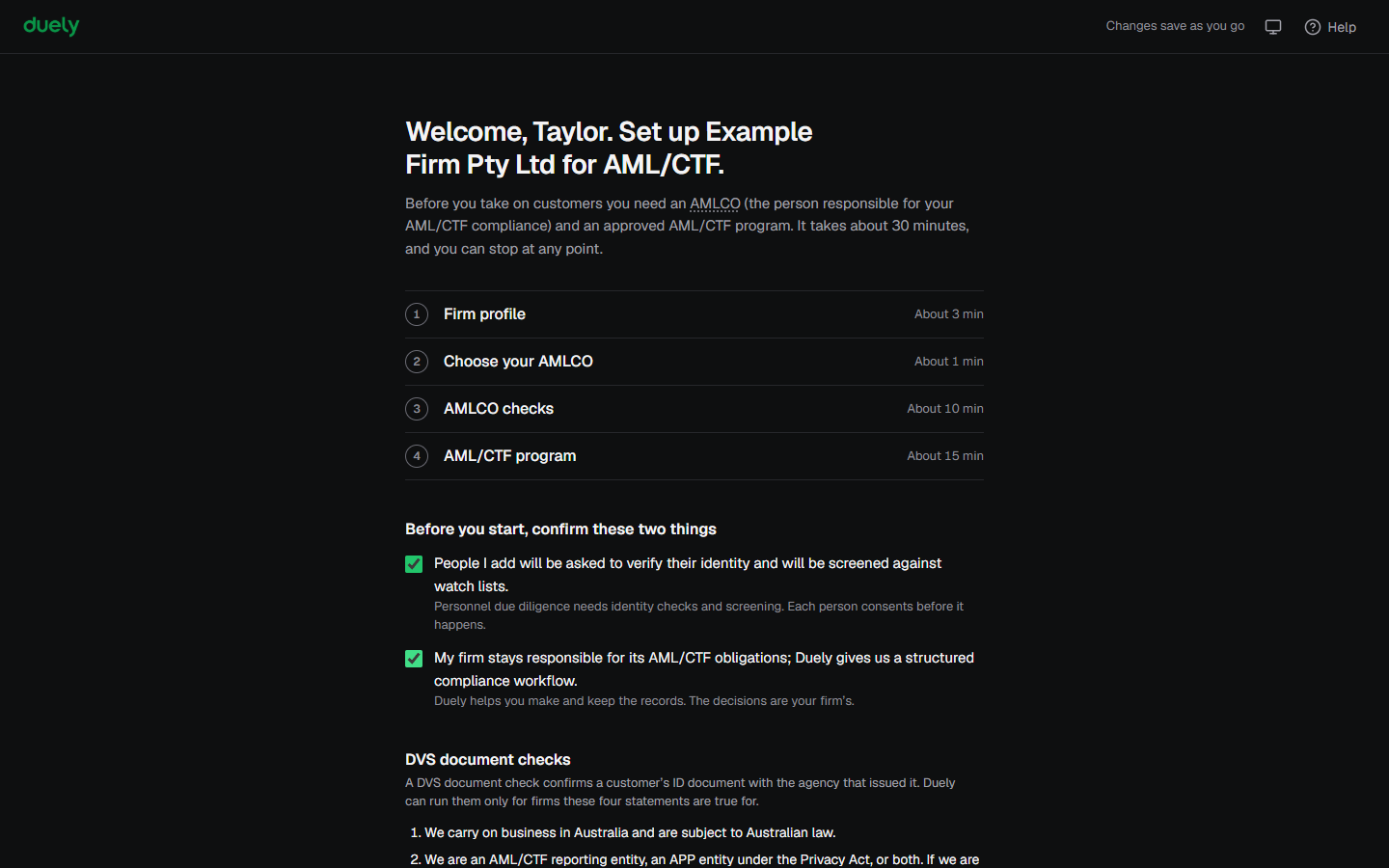
The Welcome screen is the first screen after you sign up. It shows what setup covers, and it asks you to confirm two statements before you start. Setup takes about 30 minutes, and you can stop at any point.
You run every setup step as the person who signed up.
Why this matters
The law makes your firm responsible for assessing the people it engages in AML/CTF roles, and the firm has to be able to show how it assessed them. The two statements here are where that duty starts, and they also tell the people you add what will happen to them. See Build your program for the obligation behind it.
Before you start
Your signup must be complete, including payment. Signup records your authority to accept the two statements for the firm, and that you have read the Privacy Policy, so the Welcome screen asks for neither again.
The next step asks for your business address and phone number, so have them to hand.
Steps
-
Read the list of steps ahead: Firm profile, Choose your AMLCO, AMLCO checks and AML/CTF program. Each one shows an estimate of how long it takes.
-
Under Before you start, confirm these two things, tick People I add will be asked to verify their identity and will be screened against watch lists. This covers the people you add to your firm. Each person gives their consent before their identity is checked or they are screened.
-
Tick My firm stays responsible for its AML/CTF obligations; Duely gives us a structured compliance workflow. The obligations stay with your firm either way. Duely keeps the record of what you checked and what you decided.
-
Under DVS document checks, decide whether to turn on DVS checks. A DVS document check confirms a customer's ID document with the government agency that issued it. It is optional: you can verify customers without it. The section lists four statements. In short, your firm:
- carries on business in Australia and is subject to Australian law,
- is an AML/CTF reporting entity or covered by the Privacy Act (most Tranche 2 firms already are for their AML work), or agrees to handle personal information as if it were,
- uses Duely's verification for its own customers only, not as an agent for anyone else, and
- gets each customer's consent before an identity check, and offers another way to verify if a check can't be completed. Duely's customer consent form collects the consent.
If all four are true, tick These four statements are true for your firm. If you're not sure, leave it unticked and carry on. Setup isn't affected, and you can accept them later in Settings. See Firm branding and consent.
-
Select Start setup.
If either of the two statements is unticked, the screen shows "Confirm both statements to start." and stays where it is.
What Duely checks
- Both statements must be ticked. Until they are, the screen shows "Confirm both statements to start."
- Duely records who accepted the statements and when.
- The DVS document checks stay off until the four statements in that section are accepted.
What happens next
Duely saves the acceptance and moves to Firm profile. You can leave setup at any point and come back, and Duely returns you to the first step you have not finished.
The law
Last updated: 14 October 2026
These pages are general information about the Duely product and the AML/CTF obligations it supports. They are not legal advice and do not cover your firm's particular circumstances.