Ask the other firm for checks
Use this page when your real estate firm brokers a sale and the other side (the buyer or seller you don't act for) is checked by another firm, such as their agent or conveyancer. Anyone in your firm who works on engagements can send the request and record the outcome.
Before you start
- Add the other side as a customer, for example Alex Morgan. See Add a person.
- The engagement is a brokering engagement. See Start an engagement.
- Have the other firm's name and the email address of the person who should answer.
Steps
Mark the other side
- When you start the engagement, answer Who do you act for? (The seller or The buyer (buyer's agent)) and give each customer a role. Duely marks the customers on the side you don't act for as the other side automatically. An engagement can't hold only the other side: add the customer you act for too.
- If the other side only becomes known later (usually once an offer is accepted), open the engagement's Customers and people tab and choose Add a customer. Pick the Customer and Role, tick The other side (you don't act for them), record the Nature and purpose and choose Add.
Send the request
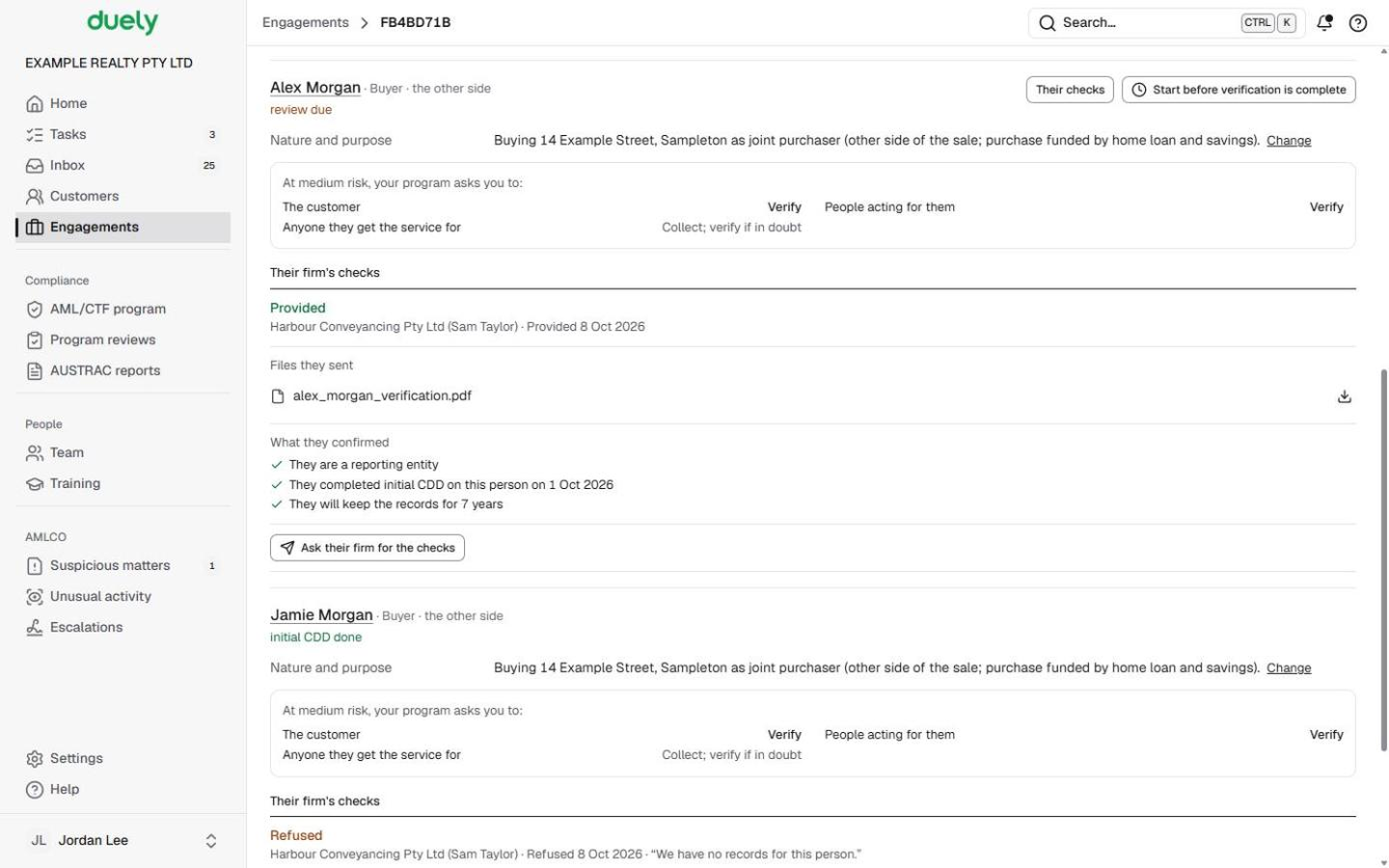
- On the Customers and people tab, find the other side's customer. Under Their firm's checks it reads Not asked yet. Identity is always asked for; choose the rest.
- Choose Ask their firm for the checks. Fill in Their firm, ABN (optional), Who the request is for and Email.
- Under What's wanted, tick at least one of Beneficial owners, PEP and targeted financial sanctions screening and Source of funds. Identity is always asked for on top.
- Set Due back by. If you have recorded a delayed start for this customer, it starts from that deadline. It can't be in the past.
- Choose Send the request. Their firm gets an email with a link. A second request on the same engagement starts from the last firm and contact you used.

What the other firm sees and does is on Answer a checks request.
Read the outcome
- Their firm's checks shows where the request is: Waiting for their firm (with the sent and due-back dates), Their firm has opened it, then one of:
- Provided: with Files they sent (download each one) and What they confirmed, for example that they are a reporting entity, the date they completed initial CDD on this person, and that they will keep the records for 7 years. The files are also saved to the customer's Documents tab.
- Refused: with the date and, if they gave one, their reason.
- No answer by the due date.
- You also get an Inbox note when they answer or the due date passes.
If the checks don't come
- A refusal or no answer doesn't complete the customer's checks. Verify them directly from the customer's Checks tab (see Identity checks), or send a new request.
- If the other side themselves won't cooperate after all reasonable steps, choose Record non-cooperation. It appears while a delayed start is open for them (see Start before verification is complete). Record each of The steps you took with its date (Add another step for more), What difficulties you met, and answer Do you think the refusal itself is suspicious? Choose Record.


What Duely checks
- At least one extra item. Send the request says what is missing instead of sending a request with identity only.
- Only the other side of an open, in-scope brokering engagement has Their firm's checks.
- Provided checks are relied on only once approved. If your program allows relying on another firm's checks, the provided checks are recorded as reliance and wait for the person your program names to approve them, in Tasks.
- Non-cooperation closes the customer's delayed-start deadline. It needs at least one dated step, the difficulties and an answer to the question. The engagement continues.
- Concluding without the other side's checks. If nothing is recorded for them, Conclude asks you to tick I acknowledge the other side's checks are not recorded and say Why are you concluding without them? It is kept in the engagement's history.
What happens next
Once the provided checks are approved, or the other side is verified directly, their line on the engagement shows their checks as done. Approve and run the engagement as usual: see Approvals.
The law
Last updated: 8 October 2026
These pages are general information about the Duely product and the AML/CTF obligations it supports. They are not legal advice and do not cover your firm's particular circumstances.