Screening and matches
Use this page to screen a customer and the people behind them, and to decide any possible matches. Anyone in your firm who works with customers can decide most matches. Confirming a match needs an admin, an approver or the AMLCO, and only the AMLCO decides a possible sanctions match.
Before you start
Open the customer and choose the Checks tab. Screening is the step after Identity for a person, and after Registration for an organisation. For a company or trust, select a person in People who need checking to see their steps.
Steps
- If the step reads Not screened yet, choose Run screening. It usually takes a few seconds, and you can leave the page.
- Read the four tiles: Sanctions, Politically exposed, Criminal lists and News. An organisation has three, because the politically exposed list only applies to people. Each tile reads No matches with a tick, a count to decide, Decided, or With the AMLCO.
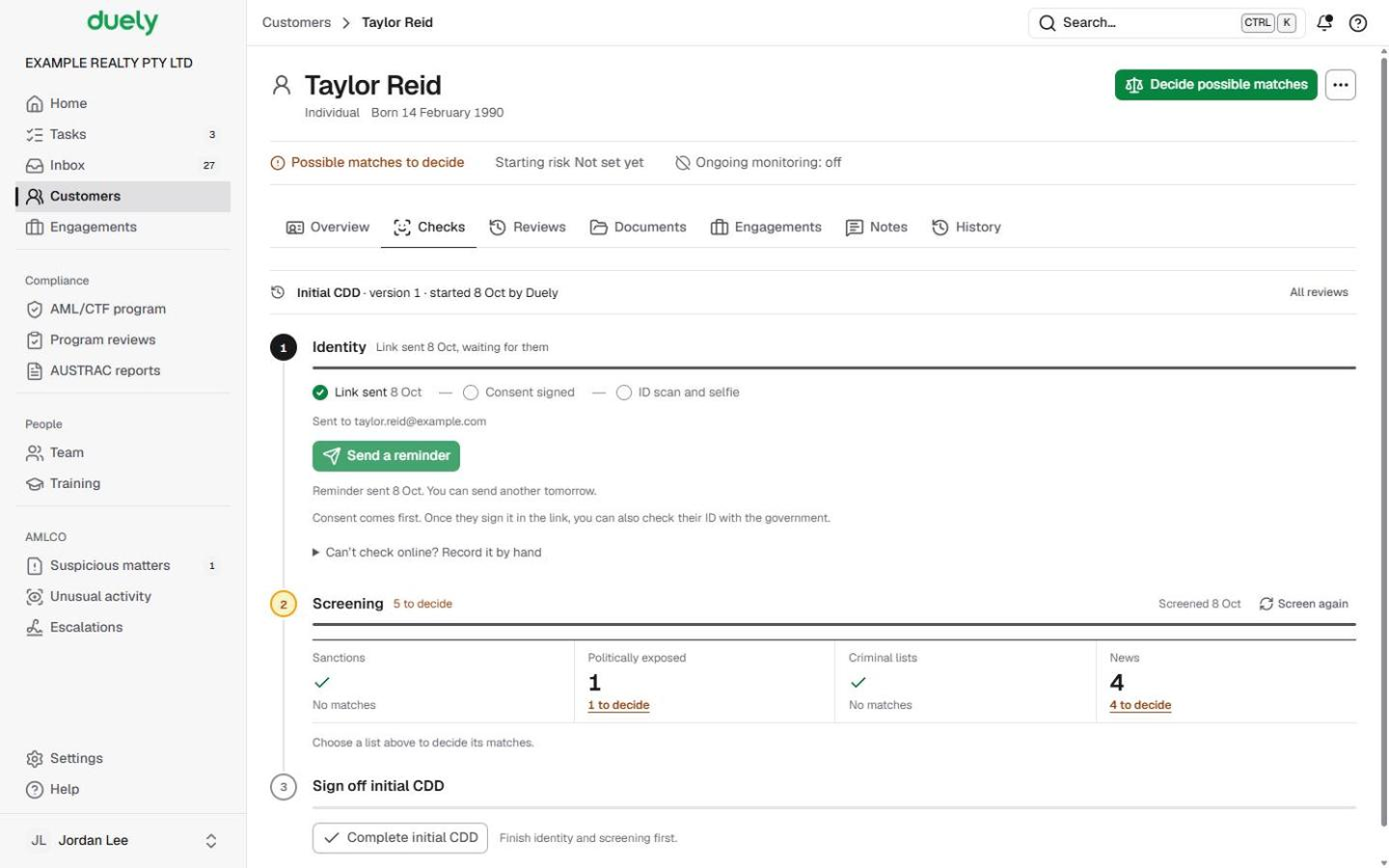
- Choose a tile with something to decide. Its list opens with the first undecided record open. Choose Decide on any other record to open it instead.
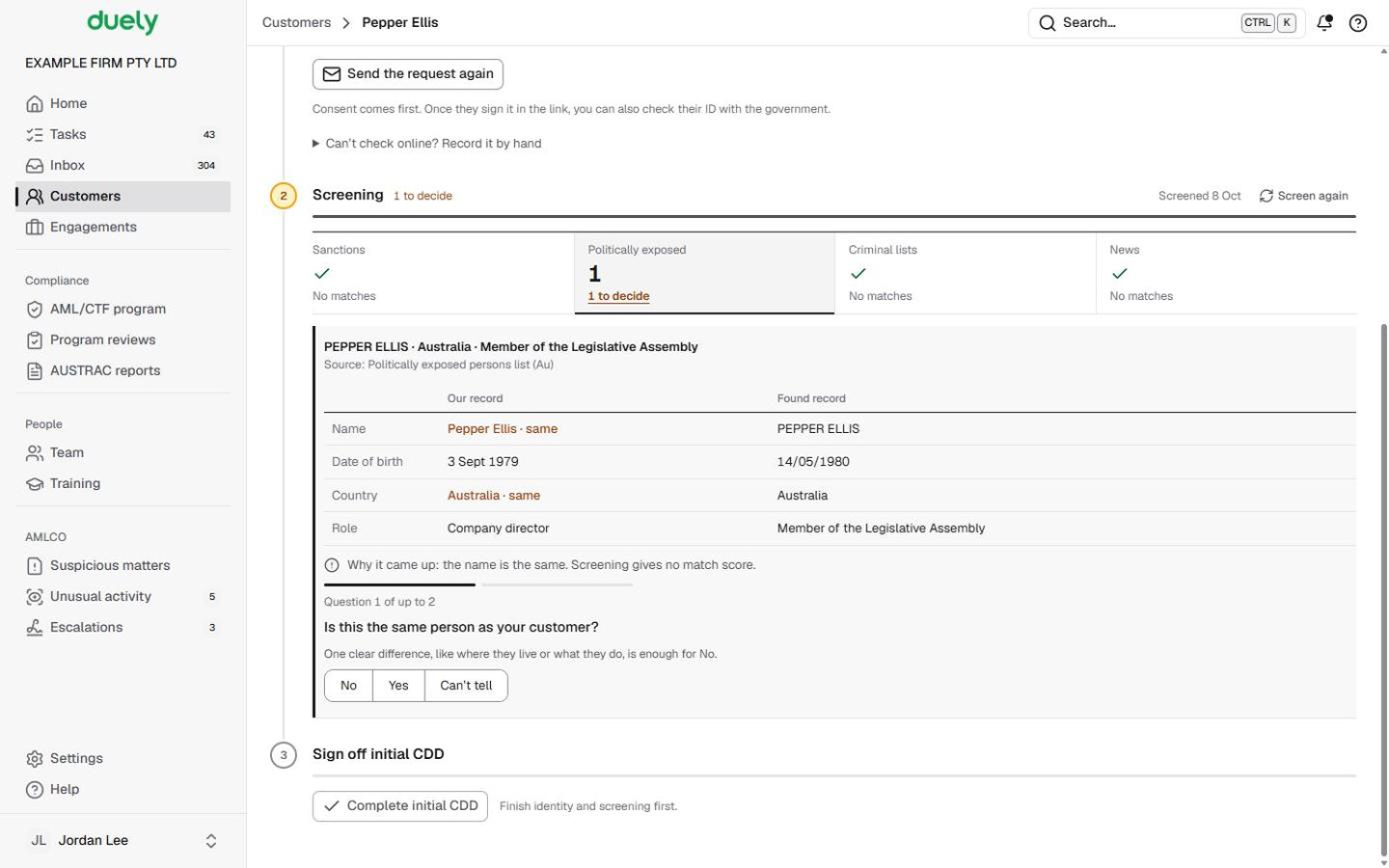
- Compare the record. For a sanctions, politically exposed or criminal record, Our record sits beside Found record (name, date of birth, country, where they are, and their role or listing), with a line saying Why it came up. The source and a link to the record page sit under its name.
- Answer the questions one at a time. The line above them reads Question 1 of up to 2 (or up to 3 for news), and back takes you to the previous one.
- Is this the same person as your customer? Choose No, Yes or Can't tell. One clear difference, like where they live or what they do, is enough for No.
- If you chose No, pick what differs under Why isn't it them?: Date of birth, Citizenship, Location, Role or job or Other (with a reason). If the listed date of birth plainly can't be theirs, Duely picks Date of birth for you to check.
- Read the Records: line, which says what your answers come to. Choose Add a note if you want to keep anything else with the decision, then Save decision. The record folds to one line with a tick, and the next undecided record opens.
News: one decision per topic
News is grouped by topic, each with the number of articles and the newest headlines. Choose the All ... headlines link under a topic (it names the topic) to read the rest, then Back to the decision. A common name brings in articles about other people, so you decide the topic as a whole:
- If any of these were about your customer, would it change their money laundering risk? No closes it as not relevant.
- Are any of the articles about your customer? No asks Why aren't they about your customer? (different age, location, job or role, or other).
- If they are, or you can't tell: Is the source reliable? A court record or an established news outlet is; an unsourced blog isn't.
Screen again
Screen again sits beside the date of the last screening at the top of the step. Use it after correcting a name or date of birth, or during a customer review.
What Duely checks
- Who can confirm. Yes (a confirmed match) is only offered to an admin, an approver or the AMLCO. Anyone else chooses Can't tell when they can't rule a record out.
- Sanctions. A possible sanctions match reads Waiting for the AMLCO to everyone else, and Can't tell isn't offered: a record that can't be ruled out is treated as a possible match. Confirming a sanctions match blocks the customer, and no engagement can start or continue for them.
- Politically exposed, can't rule out. The button reads Save and refer to the AMLCO. Work for the customer is on hold until the AMLCO decides whether it can go ahead.
- Criminal and news records that are about them, or can't be ruled out, count as a risk factor in the customer's rating. They hold nothing.
- What "decided" means. A ticked record shows its decision in words: Not a match, Confirmed match, Could not be ruled out, Not relevant or Closed: source not reliable, with who decided and when.
- Failed screening. If it didn't complete, nothing is marked clear. Choose Run screening again.
- In a review. Earlier results don't count. The step asks you to screen again once the review has started.
What happens next
When every list reads No matches or Decided for everyone, continue with Complete initial CDD. Once an engagement is approved, monitoring keeps screening the same people, and a change on a list comes back to this step as an alert. See Customer reviews and monitoring.
The law
Last updated: 8 October 2026
These pages are general information about the Duely product and the AML/CTF obligations it supports. They are not legal advice and do not cover your firm's particular circumstances.