Customer reviews and monitoring
Use this page to look at a customer again after initial CDD: when their review date comes round, something changes, or monitoring raises an alert. Anyone in your firm who works with customers can start and complete a customer review.
Before you start
The customer has finished initial CDD. See Complete initial CDD.
When a review is due, the customer reads Needs review with the reason in words, for example Review date has passed, Details changed, Ownership or control changed, New sanctions or PEP match or ID expired: the program asks for a current one. You can also start one at any time.
Steps
Start the review
- Open the customer and choose Start review at the top of the page. You can also choose Start a review on the Reviews tab, or from the More actions menu.
- In Start a review, answer Whose identity do you want to check again?
- The whole customer: everyone's identity is checked again, including the customer.
- Only some people: tick the people to check again. Each shows when their identity was last checked. Everyone is still screened again.
- Add Why? (optional), which is kept in the customer's history, and choose Start review.

If a review is already open, the same dialog reads Add to the open review and adds the people you tick.
Do the checks
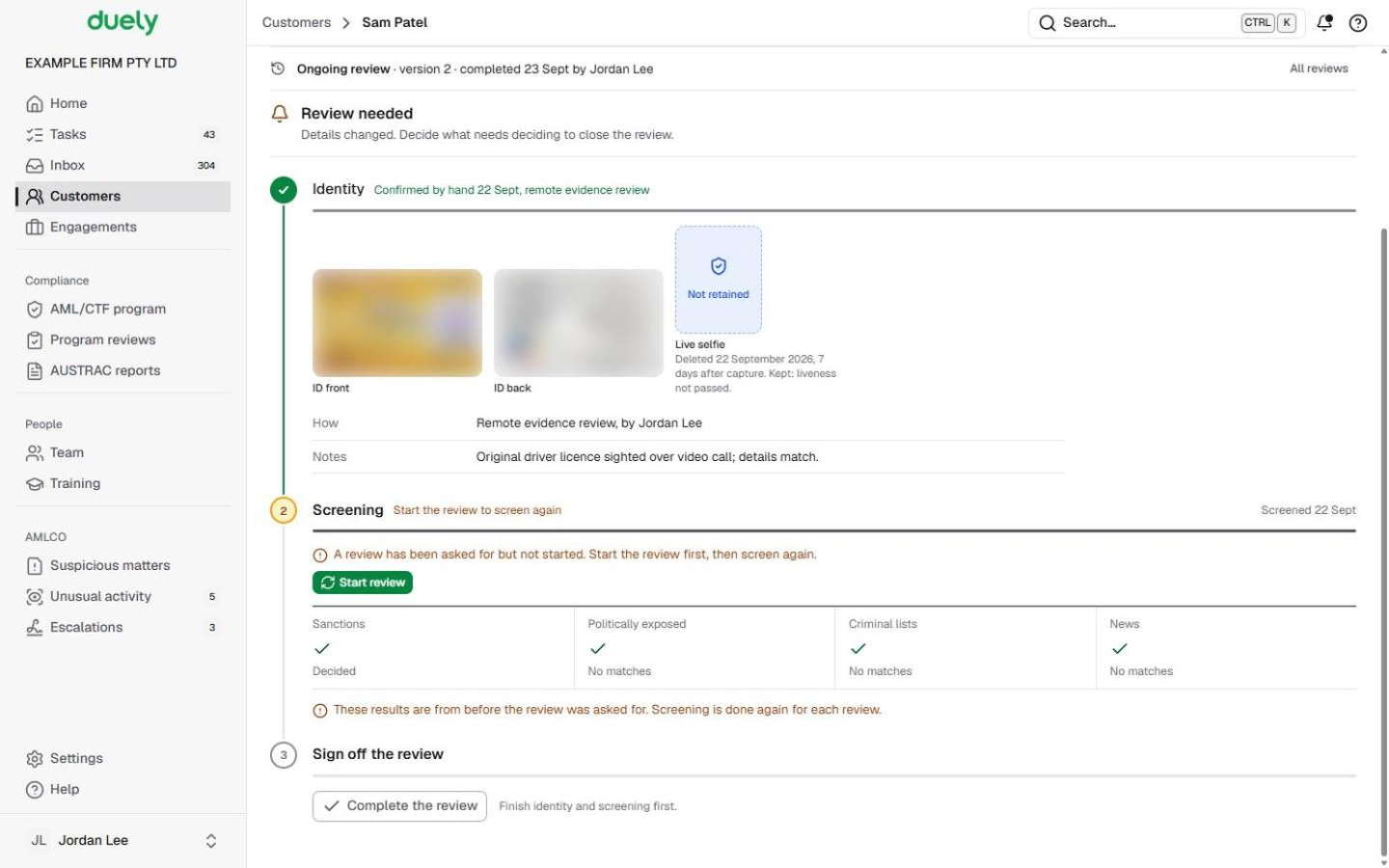
- Open the Checks tab. The line at the top reads Ongoing review, with its version and who started it.
- People you chose to check again show To check again under Identity. Send them the verification link or record the check by hand, as in Identity checks. Anyone else keeps their earlier check, shown as carried forward with its date.
- Screen everyone again. Earlier results don't count for a review, so each Screening step reads Screen again for this review until you choose Screen again. Decide any matches as in Screening and matches.
If a review is due but nobody has started it, screening waits: the step says A review has been asked for but not started. Start the review first, then screen again., with a Start review button. Screening only runs once the review is open.
Complete the review
- At the foot of Checks, choose Complete the review once Sign off the review reads Ready to sign off.
- Answer the review questions: whether the identity information and the beneficial ownership are accurate and current (and what differs if not), whether anyone is a politically exposed person, any new money laundering risk factors, any unusual or suspicious transactions or behaviour, and, for each open engagement, whether its purpose has changed and whether transactions are as expected.
- Confirm or change the Starting risk. If it changes, say why. The Review checklist fills in from your answers.
- Choose Complete review.
If you answer Yes to unusual or suspicious transactions or behaviour, Duely asks you to report it to the AMLCO from the engagement first. Only the AMLCO sees what you raise. See Report unusual activity.
Monitoring alerts
Once an engagement for the customer is approved, the page reads Ongoing monitoring: on, and the same people are screened again while it stays on. A change on a list shows as a banner (monitoring alerts to review) and as New on a list inside the person's Screening step. Choose Review monitoring alerts at the top of the page, then decide each record with the same guided questions. Decided alerts move under Earlier monitoring alerts.
What Duely checks
- Screening never carries forward into a review. Identity can, while the earlier check is still current.
- Undecided matches and alerts keep the review open. A possible sanctions match waits for the AMLCO.
- Discrepancies need detail. If information isn't accurate, say what differs.
- A changed rating needs a reason, and only the AMLCO can choose a rating lower than the proposal.
- Some reviews end with someone else. The Reviews tab can show Awaiting sign-off by the AMLCO or Awaiting a decision whether to continue until that person decides.
What happens next
The review appears on the Reviews tab as its own version, with who started it, when it finished and the rating. Choose a row to read the full record: why it happened, each person's checks, the answers, the rating and any sign-off. The customer gets a new Next review date.
The law
Last updated: 8 October 2026
These pages are general information about the Duely product and the AML/CTF obligations it supports. They are not legal advice and do not cover your firm's particular circumstances.