Complete initial CDD
Use this page to finish a customer's checks and sign off initial customer due diligence (CDD) with a starting risk. Anyone in your firm who works with customers can sign it off.
Before you start
- The customer's details are complete and, for an organisation, its ownership structure is committed. See Ownership and control.
- Open the customer and choose the Checks tab. The line at the top names what you are signing off, for example Initial CDD · version 1, with All reviews beside it.
Steps
An individual
The tab has one set of steps: Identity, Screening, then Sign off initial CDD. Work through Identity checks and Screening and matches, then go to step 4 below.
A company or trust
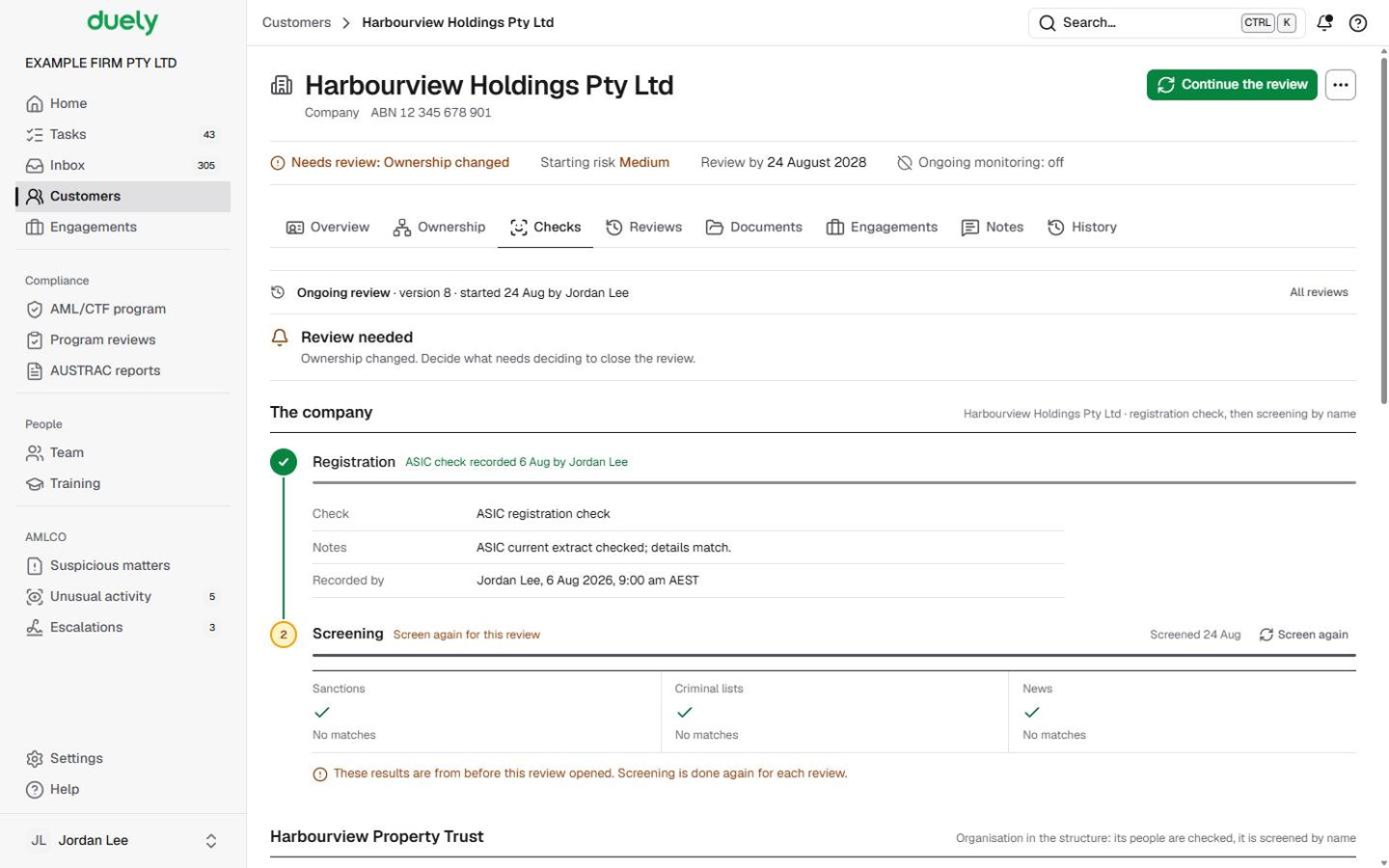
- The company (or The trust) comes first, with the line registration check, then screening by name.
- Under Registration, choose Record the registration check. In the dialog, choose What did you check? (for example ASIC registration check for a company, Trust deed for a trust, or Regulated or licensed status), name the Source (for example an ASIC current extract), choose the Result, write your Notes and choose Record.
- Under Screening, run and decide screening by name, as in Screening and matches.
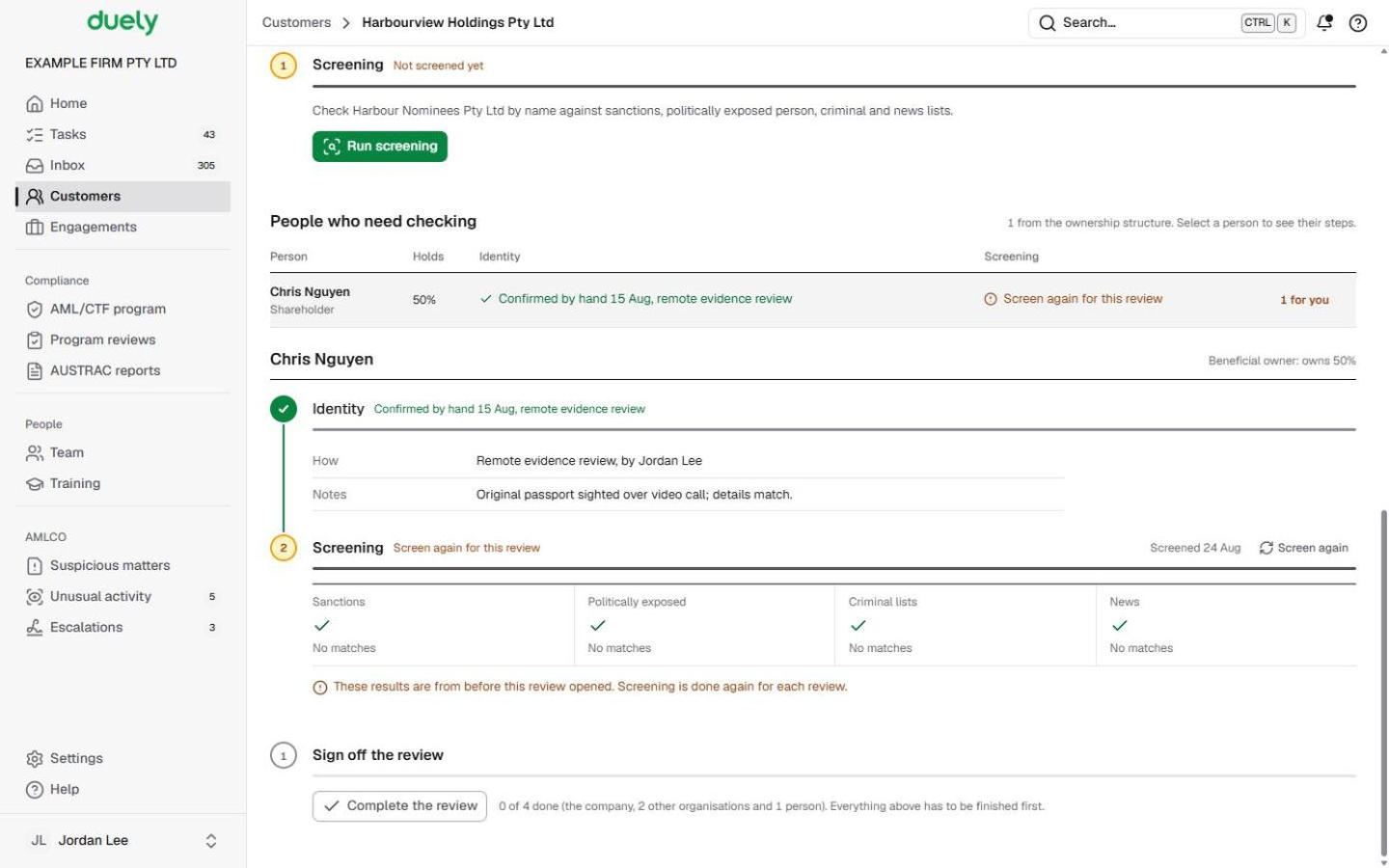
- Organisations in the structure follow, each under its own name with the reason it is there. A company trustee gets its own registration check and screening by name. Another organisation in the chain is screened by name, and its people are checked as people.
- People who need checking lists everyone from the structure, with columns for Person (and their role), Holds, Identity and Screening, and how many steps are left for you. Select a person to open their Identity and Screening steps under the table. The people with something for you to do come first.
Sign off
- At the foot, the Sign off initial CDD step reads Ready to sign off when everything above is finished. Until then, Complete initial CDD is greyed out and the line beside it says what is missing, for example 3 of 4 done (the company and 3 people). Everything above has to be finished first.
- Choose Complete initial CDD. The dialog shows the Proposed starting risk and the reasons for it.
- Keep the proposal or choose another Starting risk (Low, Medium or High). If you change it, say Why are you changing the proposal?
- Choose Complete initial CDD.

What Duely checks
- Everything above is finished. Every person needs identity and screening, and every organisation its registration check and screening, with no possible match left to decide. A match waiting for the AMLCO still counts as open.
- Details and ownership. Sign-off also waits for the customer's details and, for an organisation, a committed structure.
- A changed rating. Changing the proposal needs a reason, which is kept with the decision. Only the AMLCO can choose a rating lower than the one proposed.
- A high starting risk. Each engagement for the customer will need enhanced checks.
- A blocked customer. Sign-off isn't available. The page says This customer is blocked and the AMLCO decides the next steps.
What happens next
The customer reads Ready for engagements. The Checks tab shows a summary: Starting risk, Signed off, Next review and, once an engagement is approved, Monitoring. The button at the top of the customer page becomes New engagement. See Start an engagement.
A customer you had before 1 July 2026 shows Existing customer (before 1 July 2026) instead. The law requires initial CDD for an existing customer when a suspicious matter reporting obligation arises, or when a significant change in the nature and purpose of the relationship (for example, a different kind of service) makes the customer medium or high risk (s 36(4)). You can also choose to begin it earlier, and Duely asks for it before any new engagement for them. Either way, you choose Begin initial CDD and then work through the same steps.
The law
Last updated: 8 October 2026
These pages are general information about the Duely product and the AML/CTF obligations it supports. They are not legal advice and do not cover your firm's particular circumstances.