Add a trust
Use this page to add a trust as a customer, for example the Morgan Family Super Fund, and record the people who control it and benefit from it. Anyone in your firm who can open Customers can do it, and a customer record needs no approval.
Before you start
- Your AML/CTF program must be approved and must cover trusts.
- Have the trust deed to hand. It names the trustees, the settlor, any appointor, guardian or protector, and the beneficiaries or classes of beneficiary.
- If the trustee is a company, have its ACN and the names of its directors and shareholders.
Steps
- Open Customers, choose Add a customer, then An organisation.
- Under Look it up, search the register by name or ABN if the trust has one, and pick the matching row. Otherwise choose Can't find it? Enter the details yourself, then Trust under What kind of organisation?
- Choose the Kind of trust: Discretionary (family) trust, Fixed trust, Unit trust, Bare trust, Testamentary trust or deceased estate, Self-managed super fund or Another kind of trust. For another kind, Describe the trust.
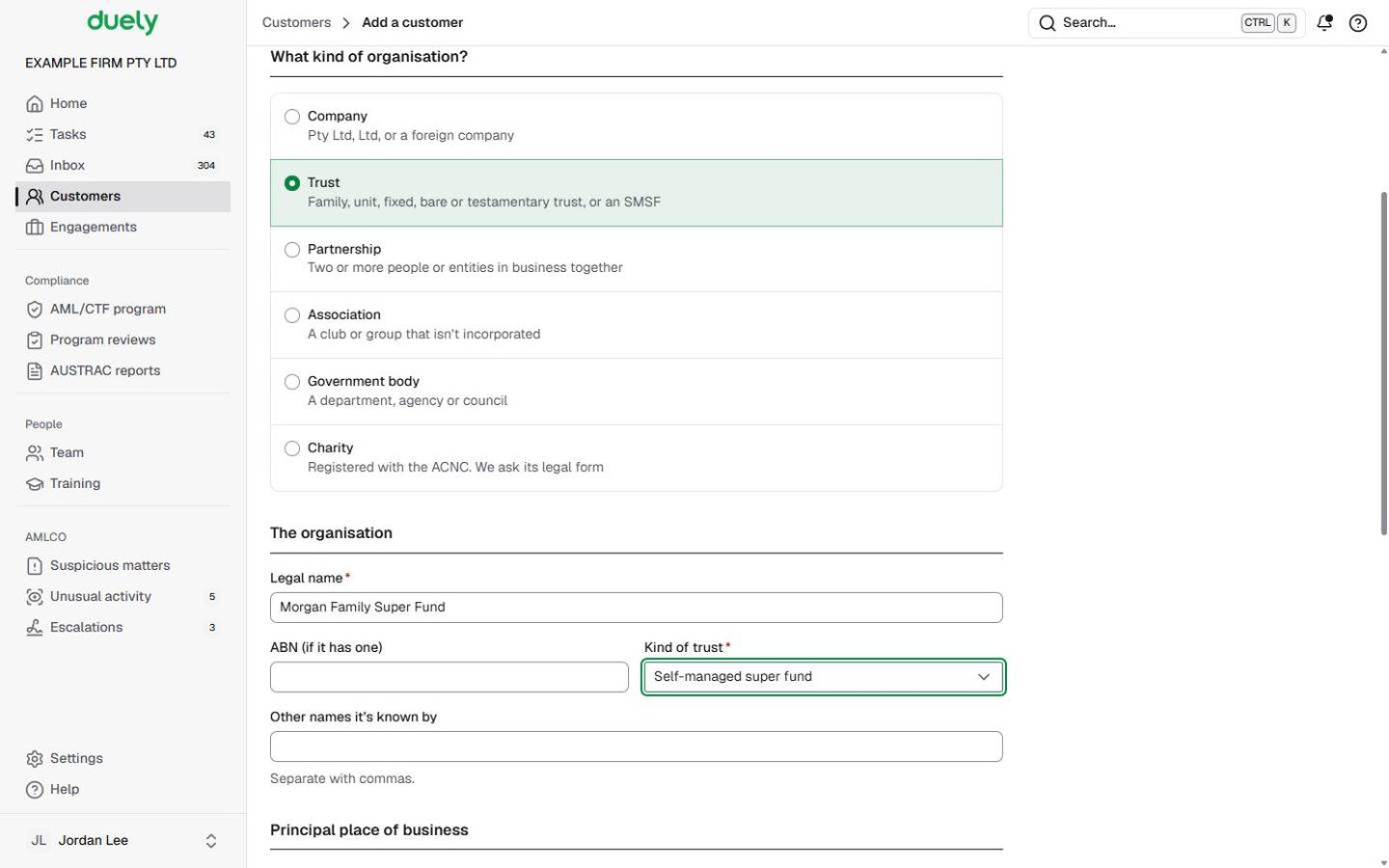
- Complete Legal name, ABN (if it has one), Other names it's known by, the Principal place of business, Contact and the AML/CTF details that apply. Choose Save and continue.
- Open the Ownership tab. Add the trustee first:
- A company trustee: choose Add an organisation, set Kind of organisation to Company, give it the Role in the trust Trustee, and record its ABN or ACN. Then add its Director and Shareholder rows under it, each director with their Director ID.
- A person trustee: choose Add a person with the role Trustee.
- Add the trust's other roles on their own rows: Settlor, Appointor, Guardian or Protector.
- Add the beneficiaries. Give each named person a Beneficiary row, with a Percentage owned where the deed fixes their share. Where the deed names a class instead, choose Add a class under Beneficiary classes and fill in Who is in the class, Where it comes from and About how many people (optional), then Add to draft.
- Choose Commit changes, add a Reason (optional) and choose Commit. Until then the structure is a draft and nothing in it counts.


Ownership and control covers every role and how to change the structure later.
What Duely checks
- The kind of trust. It is required, and another kind needs a description.
- Who has to be checked. Duely works it out from the committed structure: the trustees, settlor, appointor, guardian and protector are verified and screened; a named beneficiary is always screened, and is also verified where their share makes them a beneficial owner or their share isn't known. The Checks tab gives each person's reason. People inside a class are neither verified nor screened.
- A company trustee. It is an organisation in the structure: it gets a registration check and screening by name, and its own directors and owners are checked as people.
- A director with no director ID. A director of an Australian company needs one.
- Shares that add up to more than 100%. The rows under one parent can't.
What happens next
Committing sends each person who needs an identity check their link, where their row has an email address. On the Checks tab you then work through The trust (its registration check against the trust deed, and screening by name), the trustee company under the organisations in the structure, and the People who need checking table. See Complete initial CDD.
The law
Last updated: 8 October 2026
These pages are general information about the Duely product and the AML/CTF obligations it supports. They are not legal advice and do not cover your firm's particular circumstances.